Cross-compilation comes up constantly during embedded development — what’s actually going on there? This article starts with some of the author’s own thoughts on what “computing” even means.
1. Starting from Computation
If you read the word computer a few times, you’ll probably start thinking it should be a machine used for computation — that it should have something to do with the four basic arithmetic operations we all learned. It should be a machine that can help us do some computation. What does computation actually mean? It’s the process of going from some piece of information to another piece of information.
- Abstract the problem you’re facing into a model.
- Map that abstract model onto some other concrete thing.
- Use some property of that concrete thing to “naturally” obtain something.
- Convert what you obtained back into the answer to the original problem.
Here’s an example:
Say you’re about to host a dinner and need to prepare chopsticks. You already know each person needs one pair (that’s two sticks), and A people are coming — how many sticks do you need in total? (This is the concrete problem.)
Of course, smart as you are, you obviously know you need 2A sticks. To make it a bit harder, now say 33,223,493 people are coming — can you get the answer right away? Probably not very quickly. At this point you need some kind of tool, like scratch paper or a calculator. You perform a computation on the scratch paper or the calculator. (Here, the task of figuring out how many chopsticks to prepare has been converted into the process of computing on scratch paper or on a calculator — it’s been mapped onto another concrete thing.)
You’ve learned arithmetic, so you could naturally do long multiplication and get a result. Or, if you’d rather make full use of modern technology, you’d naturally press the corresponding buttons on a calculator and obtain the result. Either way, both approaches let you naturally obtain a result.
Finally, based on the number shown on the scratch paper or the calculator, you get the number of chopsticks you need to prepare.
Here, we went from the total number of people to the number of chopsticks needed — that’s the process of computation.
Of course, this is a simple example — simple enough to make us think modern technology is nothing special. But in reality, the problems a computer actually faces are far more complex than this.
- Let’s make the problem a bit harder: each chopstick costs $0.5, so how much does it all cost in total?
- Now factor in a volume discount: quantities over 1,000 but under 2,000 get a 10% discount, and 2,000-3,000 get a 20% discount — how much does it cost now?
- A competing seller shows up, offering a flat 12% discount across the board — which one should you choose?
- …and so on.
Questions like this could go on forever. I trust that, through these examples, you’ve now learned what “computation” is — so please go ahead and compute for me whether it will rain tomorrow.
After all, arithmetic is something we all start learning back in second grade.
A few key steps come up here: building the model — that’s the job of a whole field of algorithm researchers. Naturally obtaining another result — that’s what computer science and electrical engineering research.
These two processes are actually tightly coupled.
Let’s use this to explain the classic “Hello World,” which is most people’s very first experience with programming:
print("Hello World")You hit Enter, and the computer obediently prints “Hello World” on the screen. There’s actually a seemingly very natural shared understanding at play here:
- If “Hello World” shows up on screen as that pattern of shapes, we consider it a success.
But in reality, we never specified whether it should be black text on white, or white text on black.
So how does the computer actually understand our instructions?
A computer can’t actually read the abcd we typed — it can only read a sequence of 0101.

What’s actually the difference between a 0101 sequence and abcd? Why can it understand numbers but not letters?
Fundamentally speaking, the computer can’t understand a 0101 sequence either — it can only interpret the physical state of its electronic components. A 0101 sequence is simply the human abstraction we apply to the physical state of those electronic components.
Electronic computers are built from electronic components, the most central of which is the transistor. As an electronic device, the most important parameters of a transistor are voltage and current. Once an electronic component is powered, voltage and current can be measured at different points on it — this is the most basic property of an electronic component. And it’s exactly these voltages and currents that can be used to build an abstraction of the world.
C language textbooks tell us that the code we write gets compiled into a binary language the computer can recognize before it can actually run on the computer. You may have heard that compiling Chrome from source takes a very long time. So what actually is compilation?
Compiling computer code translates human language into a language the computer can understand.
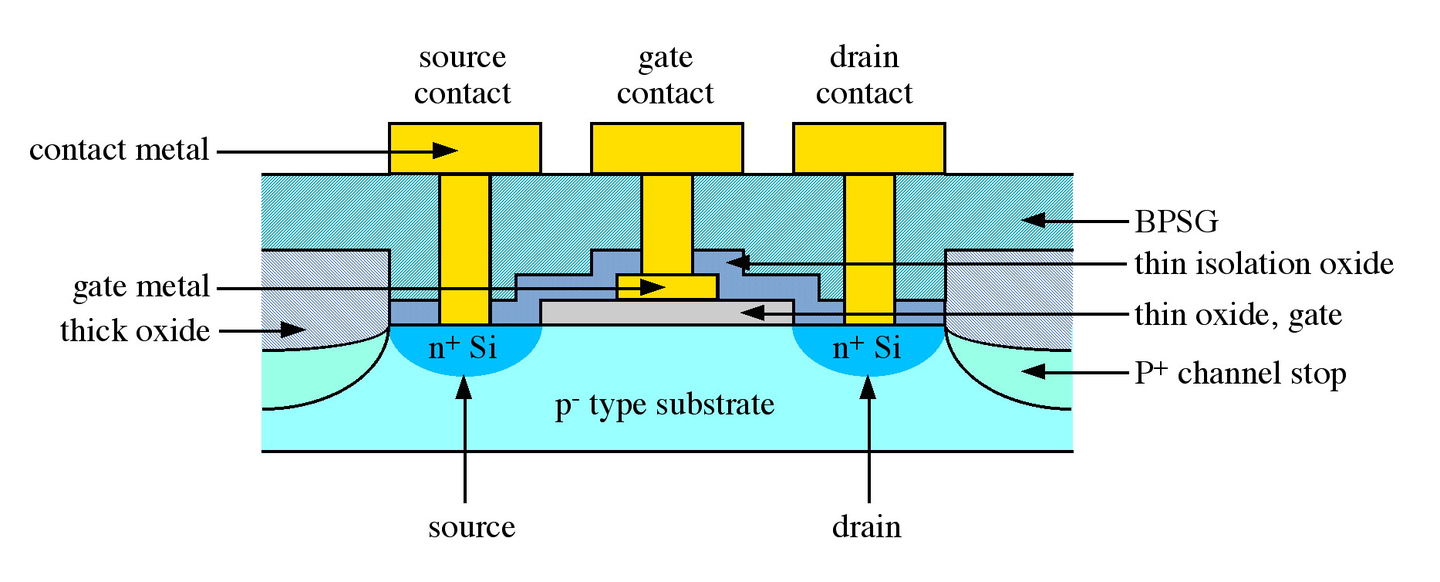
A MOSFET — applying a voltage at one port lets you measure a voltage at another port, and the voltage at that other port is related to the magnitude of the voltage applied at the current port. When manufacturing a CPU, a very important device called the MOSFET is used. Its characteristics are:
- Applying a voltage at one port (call it the input voltage) lets you measure a voltage at another port too (call it the output voltage).
- If the input voltage changes, the output voltage will (automatically) change as well.
Voltage is a continuously varying physical quantity, which isn’t convenient to process inside a computer. It’s also difficult to control a precise voltage exactly. While controlling voltage to hit some exact precise value is difficult, keeping voltage below a certain value (no matter how far below, as long as it’s below) or above a certain value (no matter how far above, as long as it’s above) is much easier to achieve physically. Think of a university exam: not failing (scoring at least 60) is much easier than scoring exactly a passing grade.
The state where voltage is above a certain value is usually called “high level,” and the state below a certain value is called “low level.” Both the high-level and low-level states can change. There’s a clear-cut distinction between high and low level — the minimum value of high level must be greater than the maximum value of low level. With the electrical characteristics of the components fully accounted for and careful design, all of this can be achieved.
For these components, the transition between high and low voltage states is a matter of physical law. As long as its input is at a certain state, its output is guaranteed to be at a certain, determined state — using the physical behavior of electronic components to simulate the process of computation. That’s the essence of what a computer’s computation actually is.
The so-called 0101 sequence describes exactly the high/low voltage states of the many complex components inside a computer. There’s no absolute relationship between 01 and high/low states — you could use 1 to represent high level and 0 to represent low level, or you could just as well use 1 to represent low level and 0 to represent high level. But once that’s decided, programs must be written according to that fixed convention, or errors will occur.
Different CPU architectures do actually have this kind of discrepancy in how they represent high and low voltage levels. Of course, high/low level is just one kind of difference — there are also differences like differing instruction sets, and so on. All of this means that different CPUs, given the same sequence of voltage levels as input, may produce different output. And ultimately, when that’s displayed on an output device like a screen, the result you see is different.
Deep down, everything inside a computer is really just a collection of states — whether it’s source code or a 01 sequence, the computer itself can’t actually tell the difference. We’re the ones who’ve applied an abstraction, and that’s what resolves these problems. To make things human-readable, the way a sequence is laid out may not be suitable for the CPU to compute against directly. So compilation is needed, to convert these commands into the voltage-level states suitable for the computer to actually compute with — that’s what compilation does.
Of course, this conversion process is enormously complex, and the above is just a simple overview. What I want to get across here is that source code that looks identical to the human eye is actually different across different platforms. And once translated into the final machine-executable voltage-level states, the results are different too. This is also why an executable built for one platform generally can’t be reused on another.
Here’s a not-so-perfect analogy: if your stomach is growling and you want to eat, in China you’d say “我餓了,我要吃東西” (“I’m hungry, I want to eat something”); but if you’re in the US, you’d probably say “I am hungry, and I want some food.” If you spoke American English in China, or spoke Chinese in America, things would very likely not go smoothly — you might even end up staying hungry. That’s because the other person just can’t understand what you’re saying.
1.2 Different Architectures, Different Executables
“Architecture” refers to the structure and rules of a CPU — for instance, whether the CPU’s instructions are 32-bit or 64-bit, whether the CPU’s instruction set is CISC or RISC. To draw a simple analogy, it’s like the difference between a Chinese worker and an American worker. Computers come in different architectures (or more precisely, different CPUs):
- x86, the platform most PCs use
- ARM, widely used in embedded devices and in most smartphones
- IBM’s PowerPC architecture
- MIPS, used by China’s domestically produced Loongson chips
- RISC-V, which has been extremely hot lately
Executables generally aren’t compatible across different architectures — the most familiar example is that a Windows application can’t be directly used on Linux, and an iOS app can’t be used on Android.
Different architectures have different performance and power trade-offs for different use cases. In short, that’s just how it is — there happen to be different architectures. To sum it up in one line: computer architectures differ for historical reasons.
The emphasis in “cross-compilation” is on that “cross.” It means understanding another set of rules while operating under one set of rules. What matters is understanding that different computer architectures work differently from one another.
2. Compiling Is Also a Lot of Manual Labor — Cross-Compilation Solves a Big Problem
Since different CPU architectures are different, it’s not just unsurprising but downright expected that a compiled executable won’t be portable across them. Different platforms have different strengths. Some architectures have strong computing power and can be used for compiling; some architectures have low power consumption and are used to run simple programs, since that lets your battery last a bit longer.
Of course, we always want to have our cake and eat it too. And it turns out we actually can — it’s just a bit more trouble — and that’s cross-compilation: compiling on one platform to produce an executable that runs on a different platform.
For instance, you could compile, on an x86 platform, an executable that runs on an ARM platform. Fundamentally, this means translating the executable on the x86 platform according to the rules the ARM platform actually runs under. The resulting compiled output then, in turn, can’t be run on the x86 platform itself.
Here’s an analogy: cross-compilation is like an American coming to China to take an exam written in Chinese. Other Americans can’t read the exam result, and even though he himself can read it, it’s not much use to him — but Chinese people can read it just fine. Except that the way he took the exam was to answer in English first, then use translation software to translate it into Chinese.
3. An Introduction to x86-Hosted ARM Compilers
This section comes from a source whose link appears to be dead now, so it’s reproduced here.
The naming convention for cross-compilation toolchains is: arch [-vendor] [-os] [-(gnu)eabi]
- arch — the architecture, e.g. ARM, MIPS
- vendor — the toolchain provider
- os — the target operating system
- eabi — Embedded Application Binary Interface
Based on whether an operating system is supported, ARM GCC can be split into OS-supporting and non-OS-supporting variants, such as:
- arm-none-eabi: this one has no operating system, so naturally it can’t support functions closely tied to an OS, like fork(2) — it uses newlib, a C library specifically for embedded systems.
- arm-none-linux-eabi: for Linux, using Glibc.
3.1 Cross-Compilation Examples
3.1.1 arm-none-eabi-gcc
(ARM architecture, no vendor, not targeting an operating system, complies with the ARM EABI) — used for compiling bare-metal systems on the ARM architecture (including ARM Linux’s boot loader and kernel, but not suitable for compiling Linux applications). It’s generally suited for chips based on ARM7, Cortex-M, and Cortex-R cores, so it doesn’t support functions closely tied to an OS, like fork(2) — it uses newlib, a C library specifically for embedded systems.
3.1.2 arm-none-linux-gnueabi-gcc
(ARM architecture, no vendor, creates binaries that run on the Linux operating system, and uses the GNU EABI)
Mainly used for ARM-based Linux systems, and can be used to compile ARM-based u-boot, the Linux kernel, Linux applications, and so on. arm-none-linux-gnueabi is based on GCC, uses the Glibc library, and is a compiler optimized and released by Codesourcery. The floating-point performance of the arm-none-linux-gnueabi-xxx cross-compilation toolchain is excellent. It’s generally used for ARM9, ARM11, and Cortex-A cores running a Linux operating system.
3.1.3 arm-eabi-gcc
The Android ARM compiler.
3.1.4 armcc
A compilation tool released by ARM itself, functionally similar to arm-none-eabi — it can compile bare-metal programs (u-boot, kernel), but can’t compile Linux applications. armcc is generally bundled with ARM’s own development tools; the compilers in Keil MDK, ADS, RVDS, and DS-5 are all armcc, so armcc compilers are all paid products (except for the patriotic edition, ha~~).
3.1.5 arm-none-uclinuxeabi-gcc and arm-none-symbianelf-gcc
arm-none-uclinuxeabi is used for uCLinux, and uses Glibc. arm-none-symbianelf is used for Symbian — never used it myself, not sure what C library it uses.
3.2 Codesourcery’s Products
Codesourcery’s product is called Sourcery G++ Lite Edition, of which the command-line-based compiler is free and downloadable from the official site, while the bundled IDE and debugging tools are paid (though there’s a 30-day trial version too).
Codesourcery has since been acquired by Mentor Graphics, so the original site’s look has now completely become Mentor’s style, but Sourcery G++ Lite Edition can still be downloaded for free after registering.
Codesourcery has long been developing and optimizing GCC targeting ARM, and its ARM GCC is currently excellent in the market — many patches may not even have been accepted into mainstream gcc yet, so it’s still worth using theirs directly (and it conveniently provides both a mingw cross-compilation build for Windows and a binary version for Linux; if you’re not particularly short on time or curious, downloading the source package and building it yourself isn’t recommended — it’s a hassle, and the shell scripts Codesourcery provides often can’t be run directly as-is, so you have to manually extract and run the key parts yourself, which costs both effort and time. If you just want to understand the details, you don’t actually need to build it yourself — just look at what steps it uses to build things, if you’re interested in cross-compilers.
3.3 ABI and EABI
ABI: Application Binary Interface for the ARM Architecture. In computing, an application binary interface describes the low-level interface between an application (or some other type of software) and the operating system, or between applications.
EABI: Embedded ABI. The Embedded Application Binary Interface specifies standard conventions for file format, data types, register usage, stack organization optimization, and parameters within embedded software. Developers writing their own assembly language can also use EABI as the interface with assembly language generated by a compatible compiler.
The main difference between the two is that ABI is for computers in general, while EABI is for embedded platforms (like ARM, MIPS, etc.).
3.2.1 arm-linux-gnueabi-gcc and arm-linux-gnueabihf-gcc
These two cross-compilers are each suited to two different architectures, armel and armhf, which take different approaches to handling floating-point computation (only ARM chips with an FPU can support these two floating-point strategies).
In fact, these two cross-compilers really just differ in the default value of GCC’s -mfloat-abi option. GCC’s -mfloat-abi option has three possible values — soft, softfp, hard (the latter two both require an FPU floating-point unit on the ARM chip; soft is compatible with both of the others, but softfp and hard are mutually incompatible modes):
- soft: doesn’t use the FPU for floating-point computation at all, even if an FPU is present — it uses a software-based mode instead.
- softfp: the default for the armel architecture (corresponding compiler: arm-linux-gnueabi-gcc). It computes using the FPU, but passes parameters via regular registers — this way, on an interrupt, only the regular registers need to be saved, keeping interrupt overhead low, though parameters need to be converted to floating-point before computation.
- hard: the default for the armhf architecture (corresponding compiler: arm-linux-gnueabihf-gcc). It computes using the FPU, and also passes parameters via the FPU’s own floating-point registers, skipping the conversion step — giving the best performance, but at the cost of higher interrupt overhead.
Summary
This article gave a simple conceptual explanation of the process of compiling on a computer, walked through in detail what cross-compilation actually does, and finally provided links related to cross-compilation documentation. The explanation here may not be entirely rigorous — the main goal was just to make these concepts clear.